
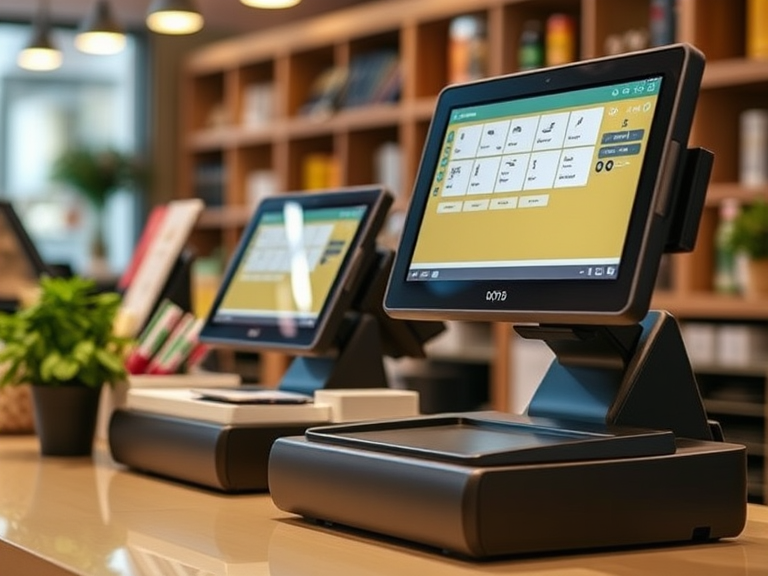
When it comes to running a small business, one of the most essential tools you can invest in is a POS system (Point of Sale system). Whether you’re running a retail store, a café, or any other small business, a good POS system helps streamline your operations, manage transactions, track inventory, and analyze sales. But with so many options available, how do you choose the best POS for small business that fits your needs?
In this guide, we will help you navigate the process of selecting the right POS system, answer frequently asked questions, and provide insights into the Top 10 POS Systems for Small Business. We will also delve into costs, features, and the advantages of different types of systems, including open payment gateway POS systems.
What is a POS System?
Definition and Purpose
A point of sale (POS) system is a comprehensive combination of software and hardware designed to facilitate business transactions, manage sales, and track customer data. At its core, a POS system aims to streamline retail operations, enhance customer satisfaction, and boost sales efficiency. Typically, a POS system includes various hardware components such as barcode scanners, receipt printers, and credit card readers, alongside software that manages sales data, inventory, and customer information. By integrating these elements, a POS system ensures that every transaction is smooth, accurate, and recorded, providing valuable insights into your retail operations and sales data.
Types of POS Software
When it comes to POS software, businesses have several options to choose from, each catering to different needs and environments:
Tablet POS Systems: Tailored for tablets, these systems offer a user-friendly interface and are often used in retail and hospitality settings. They combine the portability of mobile systems with the functionality of traditional POS systems.
Cloud-Based POS Systems: These systems are hosted online, allowing access from any device with an internet connection. They offer flexibility and real-time data synchronization, making them ideal for businesses with multiple locations or those that require remote access.
On-Premise POS Systems: Installed on a local server, these systems require a physical presence and are often preferred by businesses that prioritize data control and security. They are less dependent on internet connectivity, which can be a significant advantage in areas with unstable internet.
Mobile POS Systems: Designed for mobile devices, these systems enable businesses to process transactions on-the-go. They are perfect for pop-up shops, food trucks, and any business that needs to be mobile.
What to Look for in a POS System in 2025
1. Flexibility in Payment Processing
Let’s cut to the chase: a POS system with an open payment gateway is a must because it allows you to process payments efficiently. Why? Because it lets you choose your payment processor, ensuring better rates and avoiding the lock-in trap. Systems like Square force you to use their proprietary processing, convenient, but costly. Open gateways like NMI, CyberSource, or Authorize.net give you freedom. With these, you can:
- Negotiate competitive transaction fees.
- Switch processors if a better deal comes along without losing your data.
- Stay in control as your business needs evolve.
2. Scalability, Customization, and Inventory Management
Your business isn’t static, so why should your POS system be? A good POS system grows with you. Expanding from one store to five? Adding a new service line? Your POS should handle it effortlessly. Look for industry-specific features, like:
- Retail: Advanced inventory tracking and customer loyalty tools.
- Restaurants: Table management and online ordering integrations.
3. Technology Trends That Matter: Cloud Based POS System
POS systems in 2025 are packed with tech that makes life easier. POS systems offer essential features such as customer relationship tools, inventory tracking, back-office functionality, and analytics to enhance business operations. Here are some trends worth embracing:
- Cloud-Based Solutions: Access data anywhere, reduce IT headaches.
- AI Integration: Personalize customer experiences, predict trends, and optimize sales.
- IoT Devices: Smart shelves and connected devices streamline inventory and reduce errors.
- Contactless Payments: Meet customer demand with QR codes, mobile wallets, and tap-to-pay options.
4. Cost-Effectiveness
It’s not just about upfront costs. Subscription fees, transaction rates, and hidden charges can add up. With an open payment gateway, you can shop for the best deals and keep more money in your pocket. Transparency is key—don’t settle for less.
Essential Features of a POS System
Inventory Management
Inventory management is a cornerstone feature of any effective POS system. It allows businesses to keep track of stock levels, monitor product movement, and optimize inventory based on sales data. A robust POS system should offer:
- Real-Time Inventory Tracking: Keep an up-to-date record of stock levels to prevent overstocking or stockouts.
- Product Movement Monitoring: Analyze sales trends and product performance to make informed stocking decisions.
- Inventory Optimization: Use sales data to adjust inventory levels, ensuring you have the right products in the right quantities.
- Automated Reporting and Alerts: Receive notifications for low stock levels and generate detailed inventory reports.
- Supplier and Vendor Integration: Streamline ordering and restocking processes by integrating with suppliers and vendors.
Other essential features of a POS system include:
- Sales Tracking and Reporting: Monitor sales performance and generate comprehensive reports to gain insights into your business.
- Customer Data Management: Collect and analyze customer information to enhance service and tailor marketing efforts.
- Payment Processing: Integrate with multiple payment gateways to offer various payment options and ensure smooth transactions.
- Employee Management: Control access, track employee performance, and manage schedules.
- Online Sales Integration: Sync with e-commerce platforms to manage both in-store and online sales seamlessly.
- Mobile POS Capabilities: Process transactions anywhere, providing flexibility and convenience.
- Barcode Scanning and Printing: Use barcode scanners for quick and accurate product identification and printing.
- Customer Loyalty Programs: Implement loyalty and rewards programs to retain customers and encourage repeat business.
- Sales Data Analysis: Leverage sales data to gain insights and make data-driven decisions.
When selecting a POS system, it’s crucial to consider the specific needs of your retail business. Choose a system that offers the features and functionality necessary to support your operations and drive success.
Do You Need a POS System for Small Business?
Before diving into the details of which POS system is right for your business, it’s crucial to understand why you need one. You might be wondering: Do I need a POS system for small business?
Why You Need a POS System for Small Business
In simple terms, a POS system is a crucial tool for managing your business transactions. It facilitates customer checkouts, tracks sales, and integrates with your inventory management. Additionally, POS systems provide valuable reports to help you understand your profits and losses, ensuring your business runs smoothly.
If your small business handles sales directly with customers—whether online or in-person—having a POS system is not just convenient but essential. Whether you’re looking to accept payments in person, integrate with an online store, or track inventory, POS systems allow you to focus more on growing your business rather than managing the logistics of transactions.
How Do I Choose a POS for a Small Business?
Selecting the right POS system can be overwhelming, especially with so many options available. Here are the key factors you should consider to make the best choice for your business.
Assess Your Business Needs
The first step in choosing the right POS system is understanding your business needs. Are you running a retail store, a café, or an online business? Different types of businesses will have different requirements for a POS system. For example, a retail business might need advanced inventory management features, while a restaurant may require table management and order-taking features.
Budget Considerations
If you are working with a limited budget, you might want to look for cheap POS systems for small business or systems that have no monthly fees. Be mindful that while some POS systems are free, they may charge per transaction or offer limited features.
Integration with Other Tools
Does the POS system integrate with your existing business tools? For example, can it sync with your accounting software or CRM system? Integration ensures smooth business operations.
What Is the Most Widely Used POS System?
There are many POS systems available, but some are more popular and widely used than others. For example, Shopify POS is a widely used option, especially for businesses that also operate online.
What POS Does Starbucks Use?
Starbucks uses a custom POS system designed specifically for its needs. However, businesses looking for similar functionality might consider POS systems that integrate well with mobile payments, loyalty programs, and inventory management.
The Three Types of POS Systems
When considering what is the best POS system for your small business, it’s important to know the three main types of POS systems:
1. Traditional POS Systems
These are usually hardware-based systems that include a cash register, card reader, and receipt printer. They are often used in retail environments.
2. Cloud-Based POS Systems
These POS systems store data on remote servers and can be accessed from anywhere with an internet connection. They are ideal for businesses that operate in multiple locations or need mobile access.
3. Mobile POS Systems
These systems use smartphones or tablets as their main hardware and are ideal for businesses on the go, such as food trucks or pop-up shops. Mobile POS systems are generally easy to set up and cost-effective.
The Top 10 POS Systems for Small Business
Now that you understand how to choose the right POS system for your business, let’s explore the Top 10 POS Systems for Small Business. These systems have been carefully selected based on their affordability, features, and ease of use.
1. Square POS
Square POS is one of the most popular POS systems for small businesses due to its simple setup and no monthly fee structure. Square charges a small fee per transaction, making it a good choice for businesses that want to keep costs low. Which POS system has the lowest fees? Square is often a go-to for affordable solutions.
2. Shopify POS
If you’re running an online store and need to integrate seamlessly with your e-commerce platform, Shopify POS is a great option. It allows you to track sales, inventory, and customer data all in one place. However, Shopify POS does come with a transaction fee, so be sure to calculate costs based on your sales volume.
3. Toast POS
Designed for the restaurant industry, Toast POS offers both in-store and online ordering. It supports a range of features including payment processing, staff management, and reporting.
4. Lightspeed POS
Lightspeed POS is known for its advanced inventory management system, which is ideal for retailers. It allows businesses to manage products, track sales, and generate reports easily.
5. Clover POS
Clover POS offers a flexible pricing model and hardware options. It supports a wide range of businesses, from retail to restaurants, and integrates well with third-party apps.
6. Vend POS
Vend POS is a cloud-based system that’s particularly popular among retailers. It offers strong inventory management and integrates easily with accounting and CRM tools.
7. Revel POS
Revel POS offers an all-in-one solution for restaurants, bars, and retailers. It comes with a variety of features like staff management and inventory tracking.
8. PayPal Here POS
PayPal Here POS is a mobile POS system that lets businesses accept payments anywhere. It’s ideal for small businesses that operate in various locations or need an easy-to-use mobile system.
9. SumUp POS
SumUp POS offers simple and affordable POS systems with no monthly fees. It is best for small businesses that need basic functionalities at a low cost.
10. Zettle POS
Owned by PayPal, Zettle POS is an affordable mobile POS system. It’s perfect for small businesses that don’t require complex POS features and want a straightforward setup.
Selecting the Right POS System for Your Business
When selecting the right POS system for your business, consider the following steps:
Determine Your Budget
How much can you afford to spend? Some POS systems charge a monthly fee, while others may have a pay-per-transaction model. Be sure to assess your expected transaction volume and decide which option makes the most sense financially.
Evaluate POS Features
What features do you need? Look for systems that offer open payment gateways, inventory management, and integration with other business tools.
Benefits of Using Open Payment Gateway POS Systems
Flexibility and Cost Savings
Open payment gateways allow businesses to choose from a variety of payment processors, often leading to lower fees. Which POS system has the lowest charges? Open gateways can help businesses reduce transaction fees by selecting the most affordable payment processors.
Better Integration
These systems allow for greater integration with other business tools such as accounting software, CRM systems, and e-commerce platforms. This seamless integration helps you save time and avoid errors.
Why Swipesum Is Your Ideal POS Partner
When searching for the best POS system, Swipesum is an ideal partner. They provide expert advice, help you compare various POS systems, and secure the best rates for your business. Swipesum can help guide you through the decision-making process and ensure you select the right system that aligns with your business goals.
Steps to Get Started with Swipesum
- Reach out for a consultation to discuss your business needs.
- Compare POS systems based on fees, features, and integrations.
- Select the POS system that fits your budget and requirements.
How Much Does a POS System Cost?
The cost of a POS system can vary depending on several factors, including the hardware, software, and monthly fees. Some systems, like Square and SumUp, charge no monthly fee but take a small percentage of each transaction. Others, like Shopify POS, charge a monthly fee but offer more features.
Conclusion
When it comes to selecting the best POS system for your small business, there’s no one-size-fits-all answer. The key is to consider your business needs, budget, and the features that matter most to you. Whether you’re looking for a POS system for small business free, or seeking a system with open payment gateways, the right choice will help your business grow and run more efficiently.
By evaluating the options we’ve discussed and using Swipesum’s expert guidance, you’ll be on your way to making an informed decision that benefits your business in the long run.

